A rotor moved outside of the boundary of the turbulent wind field, or the field ran out of data
Ashes reads the wind for every aerodynamical blade station at every time step. This page covers what happens when the turbulent wind field cannot answer for one of those stations. There are two quite different reasons why it might not be able to, they need opposite remedies, and only the first of them stops the run in every version of Ashes — so the first thing to work out is which one you have.
- The rotor moved outside the field: the blade station is beyond the field’s width or height. The field needs to be wider and taller.
- The field ran out of data: the simulation reached a time the field does not cover. The field needs to be longer, or the simulation shorter.
1 The rotor moved outside the field
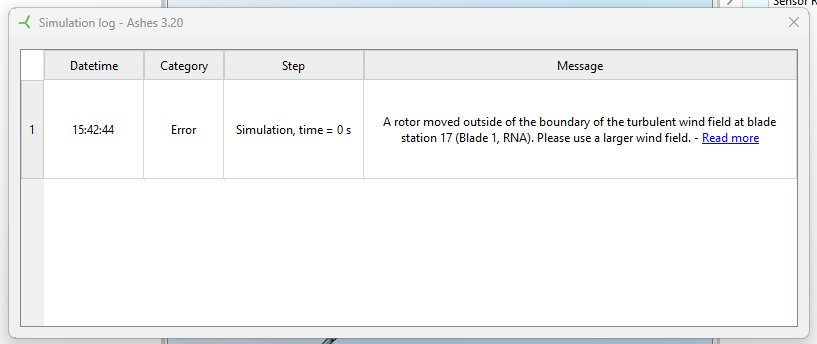
This error message will appear as shown in the image below:
The most common situations where this happens are
- when the turbulent wind field is smaller than the rotor, for example because it was created for a smaller rotor;
- when you are using a turbulent wind field that was created for a single rotor turbine on a multi-rotor turbine;
- when the model has moved during the simulation, for example a floater drifting, to the extent that the rotor is outside of the turbulent wind field.
The first case is illustrated below:
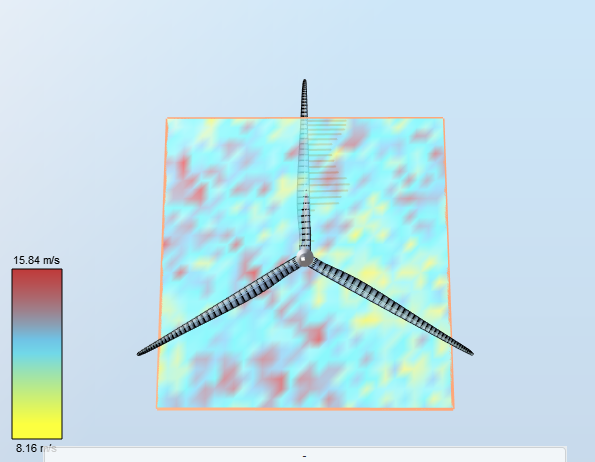
In this example, the turbulent wind field was created for the NREL 5-MW wind turbine (rotor diameter of 126 m) but used on the DTU 10-MW wind turbine (rotor diameter of 178 m)
1.1 How to resolve it
Use a wind field that is wide and tall enough to cover the rotor throughout the simulation, not only at the start. If the model moves — a floater drifting, for instance — allow for that movement as well as for the rotor.
With
Base 2D grid on rotor(s)?
ticked, which is the default, the field is dimensioned from the rotor diameter scaled by
Width size factor
(
TurbSimMann.Grid2dSizeFactorWidth
) and
Height size factor
(
TurbSimMann.Grid2dSizeFactorHeight
). Both default to
1.1
. That is the recommended value onshore, but it leaves little room for a turbine that displaces or rotates much, so raise them for a floater and regenerate the field.
If the grid is dimensioned by hand instead, set
Width of 2d grid
(
TurbSim.24Grid2dWidth
) and
Height of 2d grid
(
TurbSim.23Grid2dHeight
) large enough yourself. A field imported from a file has whatever extent it was made with, so it has to be regenerated or replaced.2 The field ran out of data
A turbulent wind field covers a finite length of time. When the simulation passes the end of it there is no wind left to read. Nothing has moved sideways in this case — the rotor is exactly where it should be, and the field simply stops.
Important: in Ashes 4.3.2 and earlier this does
not
stop the run and reports nothing at all. Past the end of the field Ashes reads every wind component as zero, so the simulation carries on to its end on the mean wind with exactly no turbulence, and finishes normally. The results look complete and are silently non-conservative — a fatigue or design-load-case result computed partly in still air. If a run was longer than its wind field, treat its output as invalid whether or not anything was reported.
The length of a generated field is set by
TurbSim.21UsableLengthOfOutputTimeSeries
, shown as
Usable time
in the TurbSim parameters. It defaults to
600 s
. TurbSim writes a little more data than that, because it needs a margin to shift the field when the turbine yaws: it adds the time the wind takes to cross the field, that is the grid width divided by the mean wind speed at hub height. For a field 139 m wide in a mean wind of 12 m/s that is about 11 s, so a usable time of 600 s carries the simulation to roughly 611 s and no further. A wider field or a slower wind adds more; either way the margin is small, and is not something to rely on.
Note: a batch run sets the usable time from the duration of each load case, so a batch does not normally hit this. A simulation started from the main window uses the TurbSim parameters as they stand, so this is the path where a long run outruns its wind.
2.1 How to resolve it
Either give the field more time or ask for less of it:
-
raise
Usable time
(
TurbSim.21UsableLengthOfOutputTimeSeries) to at least the duration of the simulation, and regenerate the field — changing the parameter alone does not lengthen a field that has already been generated; - or shorten the simulation so that it finishes inside the field you have.
If the field comes from a file rather than from parameters, its length is fixed by the file, so the only option is a shorter simulation or a new file.
See
Turbulent wind
for how the field is set up, and
Turbulent wind tool
for generating one.