Bladed DLL
Your model can be coupled with an
external DLL that will control the generator. Such DLL must have the Bladed format. Once you have selected the Bladed DLL controller in the dropdown menu, go to the
Wind turbine part and click the
Bladed DLL action button as shown in the figure below:
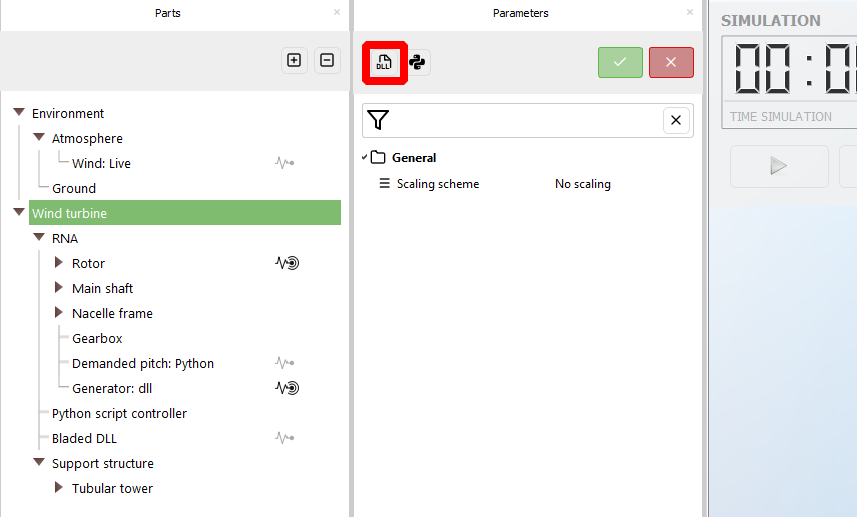
This will open a dialog which enables you to browse through your folders and select the DLL. Once you have selected the DLL file, the rest of the parameters are set by default to values that should make the controller work.
If any input files are required for the DLL to run, they must be located in the same folder as the DLL.
When you select the DLL, Ashes stores a copy of it and of these input files in the project, and simulations always use that copy. Changes made afterwards to the original files, for instance to a parameter in the ROSCO
.IN file, are therefore not taken into account. To use them, select the DLL again in the same dialog, even if it is the same file: Ashes then copies the current version of the files. Save the project afterwards, or the new version is lost when the project is reopened. Files written by the controller itself, such as debug output, are not written next to the original DLL either; see
Debugging the controller.
Note: all files inv\cluded in the folder that contains the DLL will be uploaded to Ashes. If you have files that are not required by the DLL to function, we suggets that they are not included in the DLL folder as they will unnecessarily increase the size of the Ashes project. The total size of the input files cannot amount to more than 10 MB
- the NREL Offshore 5-MW controller: this controller corresponds to the NREL 5-MW reference wind turbine and gives good results with the RNA only, Onshore and Offshore bottom fixed templates. Information about this controller can be found here https://www.nrel.gov/docs/fy09osti/38060.pdf
- the OC3 Phase IV controller: this controller is based on the NREL Offshore 5-MW controller but has been modified in the context of the OC4 Phase IV project, which corresponds to a floating turbine with a spar buoy. The modifications brouhgt to the original controller keep it from producing negative damping above rated conditions. This controller is recommended for floating turbines. Information about this controller can be found here: https://www.nrel.gov/docs/fy10osti/47535.pdf
- the OC5 Phase III controller: this controller was defined for the OC5 Phase III wind turbine, which is slightly different than the NREL 5-MW wind turbine. It is not expected to produce good results with the NREL 5-MW model
- the DTU 10-MW controller: this controller was designed for the DTU 10-MW reference wind turbine. To see how to create the DTU 10-MW turbine with Ashes, check the Reference models section. This controller requires input files which are delivered with Ashes.
-
the
ROSCO controller, designed by NREL and offering the options to be tuned and adapted to different models. Information about this controller can be found here:
https://github.com/NREL/ROSCO
1 Removing the DLL controller
Clear the
Enable DLL check box in the same dialog to remove the controller from the model. This can be done even while control systems are set to
Bladed DLL: Ashes names the control systems that use the DLL and asks you to confirm, then switches them to schemes that need no external controller - fixed pitch, no generator and fixed yaw - and clears the path to the DLL. Nothing is substituted for what the DLL did, so choose a generator and a demanded pitch scheme before running the model.
If the DLL cannot be loaded at all, for instance because it was built for another operating system, the model cannot be opened as it is; see
The controller DLL could not be loaded.