A sensor was left out of the exported batch CSV
When you export a batch to a
CSV file, Ashes can tell you that one or more items had to be left out of the file. Clicking
Show Details... lists one line per omission, naming the load case and the sensor:
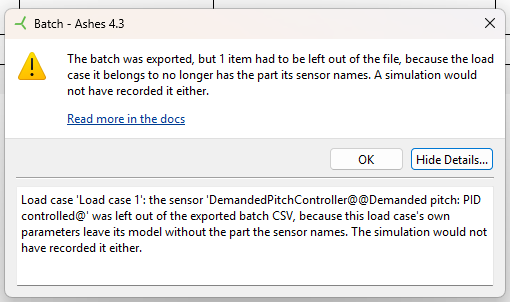
The batch file is still written, and it is correct. This message is a warning, not an error.
1 Why this happens
Every load case in a batch starts from the batch's base model, and takes its list of sensors from it. A load case can then change that model through its own parameters, and some parameters replace one part with another. When the replaced part is the one a sensor is attached to, that load case no longer has the part the sensor names, and the sensor cannot be created for it.
A common case is
IEC design load case 6.1, which sets the tag
Rna.DemandedPitchScheme to
Fixed. That swaps the RNA's
Demanded pitch: PID controlled part for a
Demanded pitch: Fixed part. A demanded pitch controller sensor that made sense in the base model has nothing to attach to in that load case.
Ashes leaves such a sensor out of the file rather than writing an entry that Ashes itself would refuse to read back: importing a CSV that names a part the model does not have fails with
Part name in the sensor list does not exist. Leaving the entry out keeps the exported batch importable, and loses nothing: a simulation of that load case would not have recorded the sensor either.
Note: the batch table in Ashes goes on showing the sensor, because it belongs to the batch, and other load cases may well be able to record it. Only the load cases that cannot carry it lose it, and only in the exported file.
2 What to do about it
In most cases, nothing: the export did what a run of the batch would have done anyway, and the message is there so that a missing channel in your results is not a surprise later.
If you did expect that sensor in that load case, the sensor is not the thing to change - the part is. Check the parameters of the load case that lost it, and in particular any parameter that selects between different types of the same part. Either choose a value that keeps the part the sensor needs, or accept that this load case records one signal fewer than the others.
If a load case loses
every one of its sensors, Ashes says so in a separate line. That case deserves a closer look: a load case exported with no sensors at all records nothing when the batch is run.
3 From the command line
The
command-line interface writes the same batch files, and reports the same omissions.
--createdlcbatch and
--applyloadcases print one
WARNING: line per omitted sensor. For
--applyloadcases, the lines are also added to the
warnings array of the
apply section of the JSON result, so a script can read them without parsing the console output.
A dropped sensor does not make the command fail: the CSV is the product of the command, it is correct, and the exit code and the
success field are unaffected.